
New Label Template Feature
New support for label placeholders in node, edge, and cluster labels.
 jjlong150
New support for label placeholders in node, edge, and cluster labels.
jjlong150Version 10.4 of the Relationship Visualizer spreadsheet introduces a powerful new addition: label templates with placeholders. You can now define reusable label formats that automatically substitute values from the 4 label columns of the data worksheet. It's a simple idea that unlocks a lot of flexibility.
Here's what's supported:
| Element | Supported Placeholders |
|---|---|
| Nodes | {label}, {xlabel} |
| Edges | {label}, {xlabel}, {taillabel}, {headlabel} |
| Clusters | {label} |
These placeholders are replaced during graph generation, giving you expressive, consistent labels while also making it easy to add icons, prefixes, suffixes, or other formatting without cluttering your underlying data.
Placeholders work anywhere a label string can appear:
label="Protocol: {label}"Let's say your data contains a label like Apollo 11, but you want it to appear in the graph as 🚀 Apollo 11.
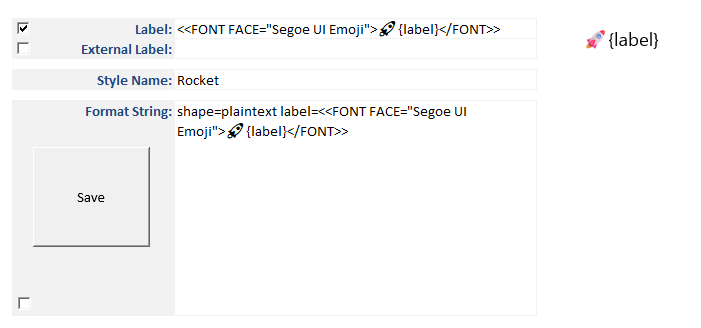
Create a style named Rocket using shape=plaintext and an HTML-like label template:
<<FONT FACE="Segoe UI Emoji">🚀 {label}</FONT>>Build this style on the style designer tab:
 |
|---|
TIP
Checking the box next to Label tells the Style Designer to include the label text in the Format String when saving the style.
Reminder
Emoji fonts are OS‑dependent. Use any emoji‑capable font installed on your system. Windows and macOS include the following emoji fonts:
Save the style to the styles worksheet:
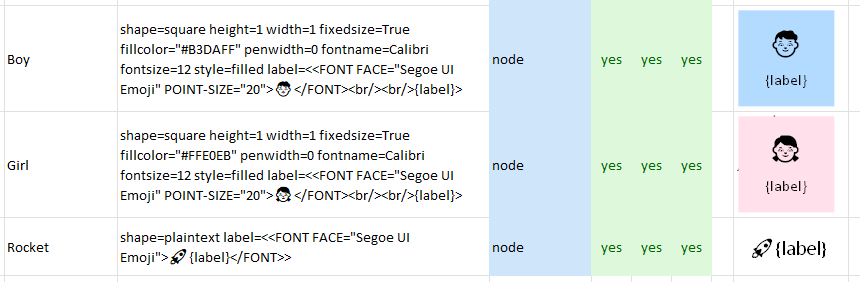
When the graph is visualized, {label} is replaced with the actual value and the result appears on the data worksheet like this:

Color vs. Black and White
Emojis show up in full color when you publish SVG and PDF, but image formats like PNG, JPG, GIF, and BMP flatten them into black‑and‑white because those exports rasterize the emoji font.
This feature opens the door to richer, more flexible styling with almost no extra work. I'm excited to see what you create with it.
If you give it a try, I'd love to hear how it works for you. Your feedback helps shape what comes next.